

Create Instagram ad creatives with AI when you need Feed squares, Story frames, and Reels stills from one product — not three separate design sessions. Most how-to guides in 2026 walk you through AdStellar, AdCreative.ai, or generic Canva flows. Few show the KreadoAI path: paste a product URL, pick Instagram-native sizes, export pixel-safe assets in about a minute.
That gap matters for DTC teams. Meta rewards placement-fit creative — a 1:1 feed image cropped into 9:16 Story loses text in the safe zone. KreadoAI's Instagram Ad Maker routes through the Ad Creative Generator with 1:1, 4:5, and 9:16 outputs from a single brief. No credit card on the free tier.
Below: four steps we timed in May 2026 — product URL to downloadable Instagram statics. Need motion? We link to the Instagram video ad maker at the end.
Why AI Beats Manual Instagram Ad Design (For Performance Teams)
Manual workflows break at volume. A freelancer needs 24–48 hours for three placements. Canva templates still require resizing, copy placement, and safe-zone checks per format.
AI ad workflows compress that:
| Manual | AI on KreadoAI |
|---|---|
| Separate Figma files per aspect ratio | One brief → 1:1, 4:5, 9:16 in one pass |
| Designer retypes headline for Story crop | Layout reflow built into generation |
| $50–150 per static set | Free tier to validate; paid from ~$10/mo (as of May 2026) |
| 3–5 variants per week | 4–8 variants per generation for A/B tests |
This tutorial covers static image ads for Feed, Story, and Reels cover frames. Video UGC and avatar ads live on Instagram video ads (AI) — different workflow, same Meta account.
How to Create Instagram Ad Creatives with KreadoAI: 4 Steps
We timed this on a live Shopify skincare URL. Total: 58 seconds from paste to first downloadable Feed square (your SKU complexity may add 15–30 seconds).
Step 1 — Add Your Product (URL, Images, or Brief)
- Go to kreadoai.com/ad-creative-generator or open the Instagram Ad Maker landing page and click Create Instagram Ads Now.
- Choose your input:
- Product URL — paste your Shopify, Amazon, or landing page link (fastest).
- Upload images — up to four product photos if you have no live URL.
- Structured brief — product name, offer line, key benefit if the page is thin.
- Wait for KreadoAI to pull visuals, tone, and differentiators from the page.
Expected result: Product thumbnail and auto-filled context appear in the project panel. If the URL fails, upload a white-background pack shot — do not skip product context or outputs drift generic.
Time: ~15 seconds.
Step 2 — Pick Instagram Formats and Creative Style
- Under Aspect ratio / placement, select the Instagram set you need:
- Feed square — 1:1 (1080×1080)
- Feed vertical — 4:5 (1080×1350)
- Story / Reels frame — 9:16 (1080×1920)
- Select a creative style — minimal studio, bold gradient, or lifestyle storytelling (KreadoAI keeps typography hierarchy Meta-safe).
- Add your offer line if not pulled from URL: e.g. "30% off first order — free shipping."
- Click Generate.
Expected result: 4–8 layout variations per selected size, with headline, benefit copy, and CTA zones populated. Readable type on mobile — the main reason to use AI over raw image models alone. (If copy-in-image fails QA, see our AI image model routing guide for text-heavy fixes.)
Time: ~20 seconds generation + ~5 seconds selection.
Step 3 — Review, Swap Copy, and Match Placement Logic
Do not download the first variant blindly. Run a 10-second placement check:
| Placement | Check before export |
|---|---|
| Feed 1:1 / 4:5 | Product focal point centered; headline readable at phone width |
| Story / Reels 9:16 | Hook text in top 60% (thumb zone); CTA above bottom 14% safe margin |
| Carousel | Card 1 = hook; cards 2–3 = feature or social proof; consistent color grade |
- Use Smart Canvas or inline edit to swap headline, CTA ("Shop Now" vs "Learn More"), or background if one variant is close but not quite.
- Expected result: One winner per placement type, ready for Ads Manager upload.
- Time: ~10 seconds for a single-SKU test (longer if you batch ten SKUs).
Step 4 — Export and Upload to Meta Ads Manager
- Click Download or Export on selected variants — PNG or JPG at native pixel dimensions.
- In Meta Ads Manager → Create ad → upload to the matching placement (Feed, Stories, Reels).
- Pair statics with your primary text and URL; static AI images do not replace UTM tracking or pixel setup.
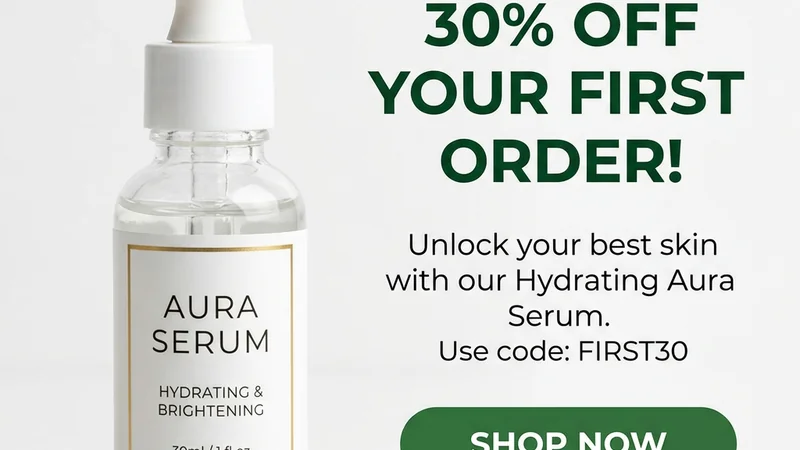
Example export: 1080×1080 Feed static from the shared skincare brief — ready for Ads Manager upload.
- For ten-plus size variants across Meta and Google, run the same brief through Multi-Size Ad Image Generator after Instagram exports are approved.
- Expected result: Pixel-safe files named by placement (
sku_feed_1x1_v1,sku_story_9x16_v1) ready for campaign build. - Time: ~8 seconds export.
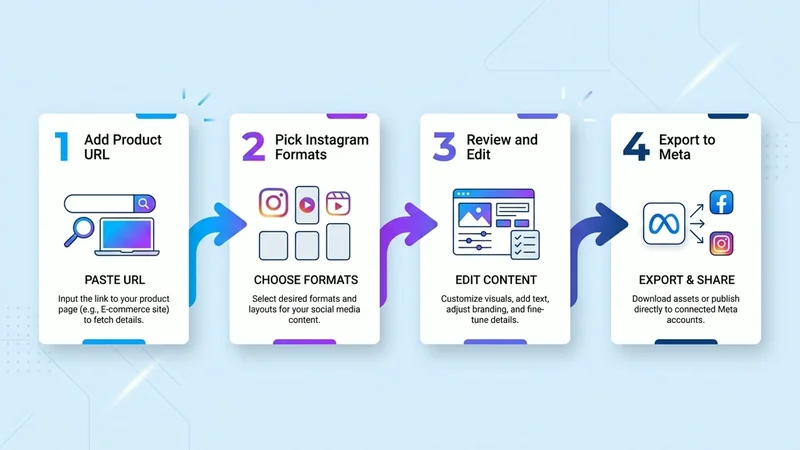
The full KreadoAI workflow: one product input → placement-fit exports in about 60 seconds.
Instagram Ad Size Cheat Sheet (2026)
Use this when briefing KreadoAI — wrong ratio is the #1 reason Story ads get rejected in review.
| Placement | Size | Ratio | Notes |
|---|---|---|---|
| Feed single image | 1080×1080 px | 1:1 | Default prospecting static |
| Feed vertical | 1080×1350 px | 4:5 | More screen real estate on mobile |
| Stories | 1080×1920 px | 9:16 | Keep CTA above bottom UI overlay |
| Reels (static frame / cover) | 1080×1920 px | 9:16 | Hook in first frame; sound-off safe text |
| Carousel | 1080×1080 px | 1:1 | Up to 10 cards; card 1 = scroll-stopper |
KreadoAI maps artboards to these automatically — you should not manually resize in an external editor unless adding a brand logo lockup.
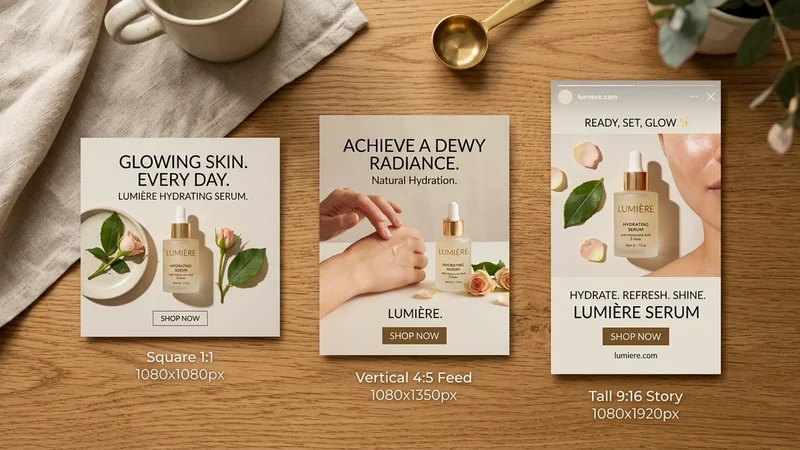
Same SKU across Feed square, vertical Feed, and Story/Reels — generate all three from one brief, do not crop one size into another.
Generate all three sizes free →
Pro Tips for Better Instagram AI Ad Output
Start from URL, not a blank prompt. Product pages give KreadoAI color, category, and offer context. Blank prompts produce generic "skincare bottle" visuals that fail brand QA.
Generate Feed and Story in the same session. Color grade and typography drift when you regenerate on different days. One brief → all ratios → one cohesive campaign look.
Burn the offer into the image for cold traffic. Feed prospecting ads with readable "30% OFF" in the creative often outperform text-only offers — especially on sound-off placements. Use GPT Image 2 inside KreadoAI if type keeps failing on other models.
Keep a naming convention. angle_hook_placement_v# saves hours when creative fatigue hits week two. Example: serum_social-proof_story_9x16_v2.
Pair statics with video for retargeting. Static AI for cold Feed prospecting; Instagram video ad maker for warm audiences who already saw the product frame.
Common Mistakes to Avoid
- One size for all placements. Cropping 1:1 into 9:16 clips headlines and CTA buttons. Generate native 9:16 Story/Reels frames instead.
- Skipping safe zones on Story. Meta UI covers the bottom ~14%. CTAs placed flush at the bottom get hidden — reviewers notice, users do not click.
- Treating AI output as final brand legal. AI speeds concept and iteration. Logo placement, disclaimer text, and trademark rules still need a human pass for regulated categories (supplements, finance, alcohol).
- Only testing one variant. Four layouts from one generation is the minimum viable test. Single-ad launches waste the main advantage of AI creative volume.
- Ignoring video when Reels CPA is lower. If Reels outperforms Feed in your account, static 9:16 frames alone may not be enough — add Instagram video ads (AI) for motion tests.
FAQ
Can AI create Instagram ads that are ready to publish?
Yes — for static Feed, Story, and Reels frame ads. KreadoAI produces sized layouts with headline, copy, and CTA zones from a product URL. You still add primary text, targeting, and budget in Ads Manager. Video ads require the video workflow, not this static tutorial.
How long does it take to make an Instagram ad with AI?
About 60 seconds for a first usable static if you have a product URL ready — we measured 58 seconds in May 2026. Complex catalogs or ten-SKU batches take longer; the bottleneck shifts to review, not generation.
What size should Instagram ads be in 2026?
1080×1080 (1:1) for Feed squares, 1080×1350 (4:5) for vertical Feed, 1080×1920 (9:16) for Stories and Reels. KreadoAI exports at these native dimensions. Do not upload smaller assets and upscale.
Is KreadoAI free for Instagram ad creatives?
Yes — permanent free tier, no credit card required. Paid plans start around $10/mo when you need higher volume. AdStellar and similar tools often gate bulk testing behind higher tiers; KreadoAI lets you validate creatives before upgrading.
Can I use a product photo instead of a URL?
Yes. Upload up to four images in the Ad Creative Generator if your product is not live on a scrape-friendly page. White-background pack shots work best for ecommerce workflows.
Do I need Canva or Photoshop after AI generation?
Usually no for performance testing. Use Smart Canvas for headline swaps or logo placement. Export to Figma only if your brand team requires strict grid compliance on every pixel.
How do Instagram static ads differ from Reels video ads?
Statics are single-frame images for Feed or Story placements. Reels video ads need motion, hooks in the first 1–3 seconds, and often sound-off captions. KreadoAI handles statics in this guide; use the Instagram video ad maker for motion.
Which AI tool is best for Instagram ads — KreadoAI or AdStellar?
Different jobs. AdStellar-focused tutorials emphasize bulk launch and automated testing matrices. KreadoAI fits teams that need creative generation first — URL to Feed + Story + Reels statics in one tool, plus video and voice in the same account. Many teams generate on KreadoAI, then upload to Meta manually or via their existing automation stack.
Ready to run the timer yourself? Open the Instagram Ad Maker, paste one product URL, and export three placement sizes before your coffee cools. Create your first Instagram ad →